
Four Phases of Moving Software Platforms
As a Kartra Certified Business Consultant & Technical Expert, I have witnessed firsthand the transformative power of moving a business onto a unified, all-in-one platform. Yet, I’ve also seen the anxiety, the delays, and the outright failures that plague poorly planned migrations. Switching the core technology that runs your business, from your email marketing to your sales funnels and membership sites, is not a task to be taken lightly. It is a strategic business decision that, when executed correctly, unlocks massive growth and efficiency.
This comprehensive guide is designed to serve as your definitive blueprint for a successful platform migration. Whether you are moving to or from Kartra, or transitioning between any complex business systems, the principles remain the same. We will break down the process into four critical areas: the essential preparation required before you begin, a detailed inventory of what needs to move, the strategic questions to ask yourself for clarity, and a step-by-step guide on how to begin the process.
Phase 1: The Critical Pre-Migration Checklist (What to Do Before)
A successful migration is 80% preparation and 20% execution. The work you do before touching a single setting in your new platform will determine the speed, cost, and ultimate success of your transition. This phase is about strategic planning, meticulous auditing, and ruthless data hygiene.
1. Define the "Why" and Set Clear Objectives
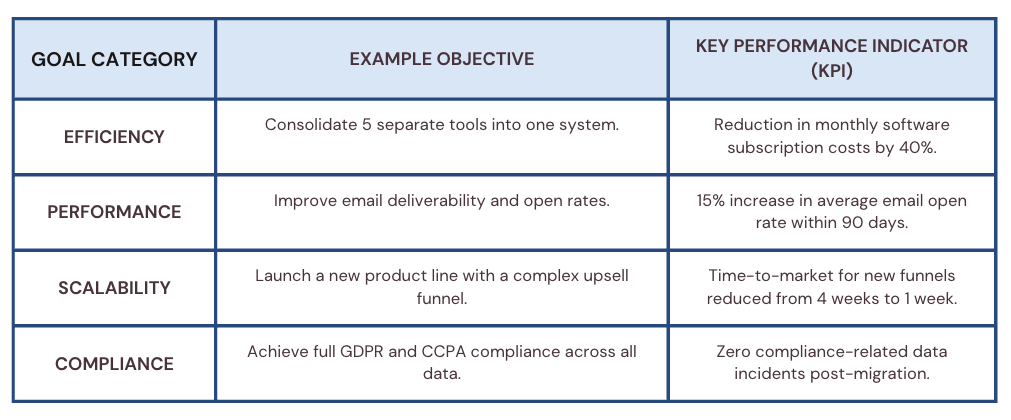
Before you even consider the "how," you must solidify the "why." A platform migration is expensive in both time and money; it must be tied to clear, measurable business goals.
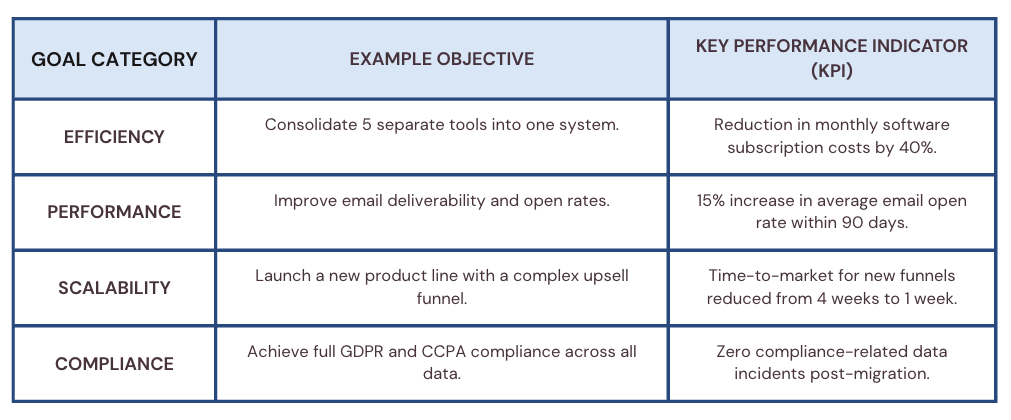
Your migration is not just a technical task; it is a business project. Clearly defining these objectives provides the necessary focus and a benchmark for success.
2. The Great Asset Audit: Inventory Everything
You cannot move what you do not know you have. The audit phase requires a complete inventory of your existing platform. This is often the most time-consuming, yet most valuable, part of the preparation.
Funnels and Pages: Map out every single landing page, sales page, checkout page, and thank-you page. Note which ones are still active and which are obsolete.
Products and Pricing: Document all producs, pricing tiers, payment gateways, and affiliate programs.
Email and Automations: List every email sequence, broadcast, tag, and automation rule. This is where complexity hides. You will likely find sequences that haven't been used in years, these are candidates for deletion.
Membership Sites and Courses: Detail the structure, content, and access rules for every course and membership level.
The goal is to create a master spreadsheet that lists every asset, its current status, and its required status in the new platform (e.g., "Migrate As Is," "Rebuild/Update," or "Archive").
3. Data Hygiene: The Non-Negotiable Step
Migrating dirty data is the fastest way to contaminate your new, clean platform. This is your chance to start fresh.
Contact Cleanup: Remove unengaged subscribers, hard bounces, and leads who have not opened an email in over a year. You are paying to store and email these contacts; cut the dead weight.
Tag and Custom Field Consolidation: Review your existing tags and custom fields. Delete redundant or confusing tags. Standardize your custom fields to ensure a clean import schema.
Compliance Check: Crucially, ensure you have clear, documented consent for every contact you plan to migrate. Separate your contact list based on their consent status (e.g., GDPR-compliant vs. non-GDPR) before export. This prevents legal issues and ensures you maintain a high sender reputation in your new system.
Phase 2: Inventory of Assets: What Needs to Move (and What Doesn't)
One of the biggest misconceptions about platform migration is that you can simply "export and import" everything. For all-in-one platforms like Kartra, this is rarely the case. While data moves, the structure is usually entirely rebuilt.
1. Data Migration: The Moveable Assets
These are the records you can typically export from your old system and import into your new one via CSV files.
Contacts (Leads): The absolute priority. You must export the full contact record, including:
First Name, Last Name, Email Address
Custom Fields (e.g., "Last Purchase Date," "Lead Source")
Tags and Lists (These are essential for segmentation)
Subscription Status (Opt-in date, consent status)
Purchase History: If possible, export a record of past purchases. This data is vital for creating advanced automations and segmenting high-value customers.
Affiliate Data: If you run an affiliate program, you must export affiliate records, commission structures, and payment history.
2. Content Migration: The Rebuild Assets
This is where the technical expert comes in. Pages, funnels, and course content are built using the proprietary builders of each platform. They cannot be directly imported.
3. Technical Assets: The Reconfiguration
These are the behind-the-scenes elements that ensure your business continues to operate seamlessly.
Custom Domains: You will need to update your DNS records (CNAME and A records) to point your custom domain (e.g., www.yourdomain.com) to the new platform. This requires coordination with your domain registrar.
Email Sender Authentication: This is critical for deliverability. You must update your DNS records with new SPF, DKIM, and DMARC records provided by the new platform (e.g., KartraMail). Failure to do this will result in your emails landing in spam folders.
Payment Gateways: Reconnect and re-verify your payment processors (e.g., Stripe, PayPal) within the new platform. You will need to update the API keys and webhooks.
Phase 3: The Strategic Self-Assessment (What Questions to Ask Yourself)
A successful migration is rooted in strategic clarity. Before you commit to the move, pause and ask these four critical questions.
Question 1: Does the new platform solve the core problems of the old one?
Many migrations fail because the new platform is simply a lateral move—it offers the same features but with a different interface. You must ensure the new system addresses the fundamental limitations that triggered the move in the first place.
If your old problem was "poor deliverability," does the new platform have a superior email infrastructure and a strict anti-spam policy?
If your old problem was "integration headaches," does the new platform truly unify the tools you need, or will you still rely on third-party connectors?
The new platform should offer not just feature parity, but a significant strategic advantage.
No platform is perfect and it will likly come with different words, different features and a whole new way of doing things.
Question 2: Is my data clean, compliant, and ready for segmentation?
Data is your most valuable asset. The migration process is the ultimate stress test for your data's integrity and legality.
Have I documented the source of consent for every contact? (Especially crucial for GDPR compliance.)
Are my tags and custom fields mapped correctly to the new system's structure? Sometimes different platforms allow for differnt character counts, some allow symbols and others don’t.
Have I tested the import process with a small, representative sample of my data?
A "yes" to these questions means you are mitigating legal and technical risk.
Question 3: Do I have the internal resources or the right external expert?
Platform migration is complex and requires a blend of technical skill, project management, and marketing knowledge.
Internal Resources: Do you have a team member who can dedicate 100% of their time to this project for the next 4-8 weeks? Do they understand DNS, API keys, and funnel mapping?
External Expert: If the answer is no, hiring a certified expert (like a Kartra Certified Consultant, heyyy) is an investment, not an expense. An expert provides a proven methodology, reduces downtime, and ensures critical technical steps (like email authentication) are handled correctly the first time.
Question 4: What is my "Go-Live" and "Rollback" plan?
Risk management is paramount. You must plan for the moment of transition and the possibility of failure.
Go-Live Plan: This is a detailed, minute-by-minute checklist for the final switch, typically done during a low-traffic period (e.g., a weekend). It includes steps like changing DNS records, turning off old automations, and announcing the switch internally.
Rollback Plan: What is the immediate plan if a critical system (e.g., checkout page, email sending) fails after Go-Live? You must maintain a working copy of your old system for a defined period (e.g., 7 days) to allow for an emergency rollback if necessary.
Phase 4: The Execution Blueprint (How to Begin This Process)
With your strategy and assets inventoried, it’s time to execute. This is a phased approach designed to build the foundation before connecting the plumbing.
Step 1: Foundation First – Migrate and Segment Contacts
The first technical step is always the data.
Import Clean Data: Import your segmented contact lists (e.g., "Active Buyers," "Blog Subscribers," "Cold Leads") into the new platform.
Apply Tags and Custom Fields: Ensure all custom fields and tags are correctly applied during the import process. This preserves your segmentation and automation logic.
Warm-Up: If you are migrating a large list, consider a "warm-up" period where you send small, highly engaged broadcasts from your new email system to establish a positive sender reputation.
Step 2: Build the Core – Recreate Essential Assets
Focus on the assets that generate revenue first.
Products and Checkout: Recreate all products, pricing tiers, and connect them to your payment gateways. Test a live purchase with a small, refundable product to ensure the entire checkout process works.
Core Funnels: Rebuild your highest-converting sales funnels and lead-generation pages. Do not try to rebuild everything at once; prioritize the top 20% of assets that drive 80% of your revenue.
Membership Sites: Recreate the course structure and upload the content. Set up the access rules and ensure the login page is functional.
Step 3: Connect the Plumbing – Technical Setup
This is the technical heavy lifting that must be done with precision.
Custom Domain Connection: Update your DNS records to point to the new platform. Verify the connection immediately.
Email Authentication: Implement the new SPF, DKIM, and DMARC records. Use an online tool to verify that your email authentication is passing before sending any major broadcasts.
Integrations: Set up any necessary third-party integrations (e.g., Zapier, calendar tools, external CRMs).
Step 4: End-to-End Testing and QA
Before the final switch, you must test every single user journey.
Lead Capture Test: Opt-in to a form, receive the welcome email, and check if the correct tag is applied.
Purchase Test: Complete a full purchase, check if the payment is processed, the customer receives the product access email, and the correct automation sequence is triggered.
Automation Test: Trigger a complex automation (e.g., a cart abandonment sequence) and verify that all steps fire correctly.
Step 5: The Flip and Post-Migration Monitoring
Once testing is complete, execute your Go-Live plan.
Redirects: Implement 301 redirects from all old page URLs to their new counterparts. This preserves SEO value.
Decommission: Turn off all automations and email sending in the old platform.
Monitor: For the first 72 hours, monitor your key metrics (sales, traffic, email deliverability) constantly. Use the old platform as a reference point to ensure performance is stable or improving.
The Value of a Certified Consultant: Why Expertise Matters
While this guide provides the roadmap, the actual journey of migration is often filled with unforeseen technical hurdles. This is where the value of a Kartra Certified Business Consultant & Technical Expert becomes undeniable. A migration is not just about moving data; it is about architecting a system that supports your long-term business vision.
An expert brings three critical advantages to your migration project:
Risk Mitigation: Experts have seen where migrations typically fail—broken webhooks, misconfigured DNS records, or lost data during CSV imports. By identifying these risks early, a consultant ensures that your business remains operational throughout the transition.
Strategic Optimization: A consultant doesn't just move your old funnels; they optimize them. They can identify bottlenecks in your current sales process and leverage the unique features of the new platform to improve conversion rates and customer lifetime value.
Speed to Market: What might take an internal team months of trial and error can be accomplished by an expert in a fraction of the time. This allows you to focus on your core business activities while your new, high-performance platform is built and tested behind the scenes.
In the world of digital business, your technology stack is your infrastructure. Investing in a professional migration is the surest way to ensure that infrastructure is solid, scalable, and ready for the next level of your growth.
Conclusion
Platform migration is a journey, not a single event. It demands a strategic mindset, meticulous planning, and technical expertise. By following this four-phase blueprint—from the critical pre-migration audit to the final, rigorous testing—you transform a daunting technical challenge into a powerful catalyst for business growth.
As a Kartra Certified Consultant, my final advice is this: Do not underestimate the complexity of the data and technical configuration. The cost of a failed migration—lost leads, broken funnels, and damaged sender reputation—far outweighs the investment in a structured, expert-led approach. Plan wisely, execute precisely, and enjoy the freedom and efficiency of your new, optimized platform.
*be sure to consider clients who have paid access to courses or materials and any recurring payments you have as depending on your choices you want to ensure that you keep those payments.